Pipeline Overview
Table of contents
- 1. BigBacter Database
- 2. Input Quality Control
- 3. Sample Clustering
- 4. Core SNP Analysis
- 5. Phylogenetic Trees
- 6. Accessory Genome Analysis
- 7. Figure Generation
- 8. Run Summary
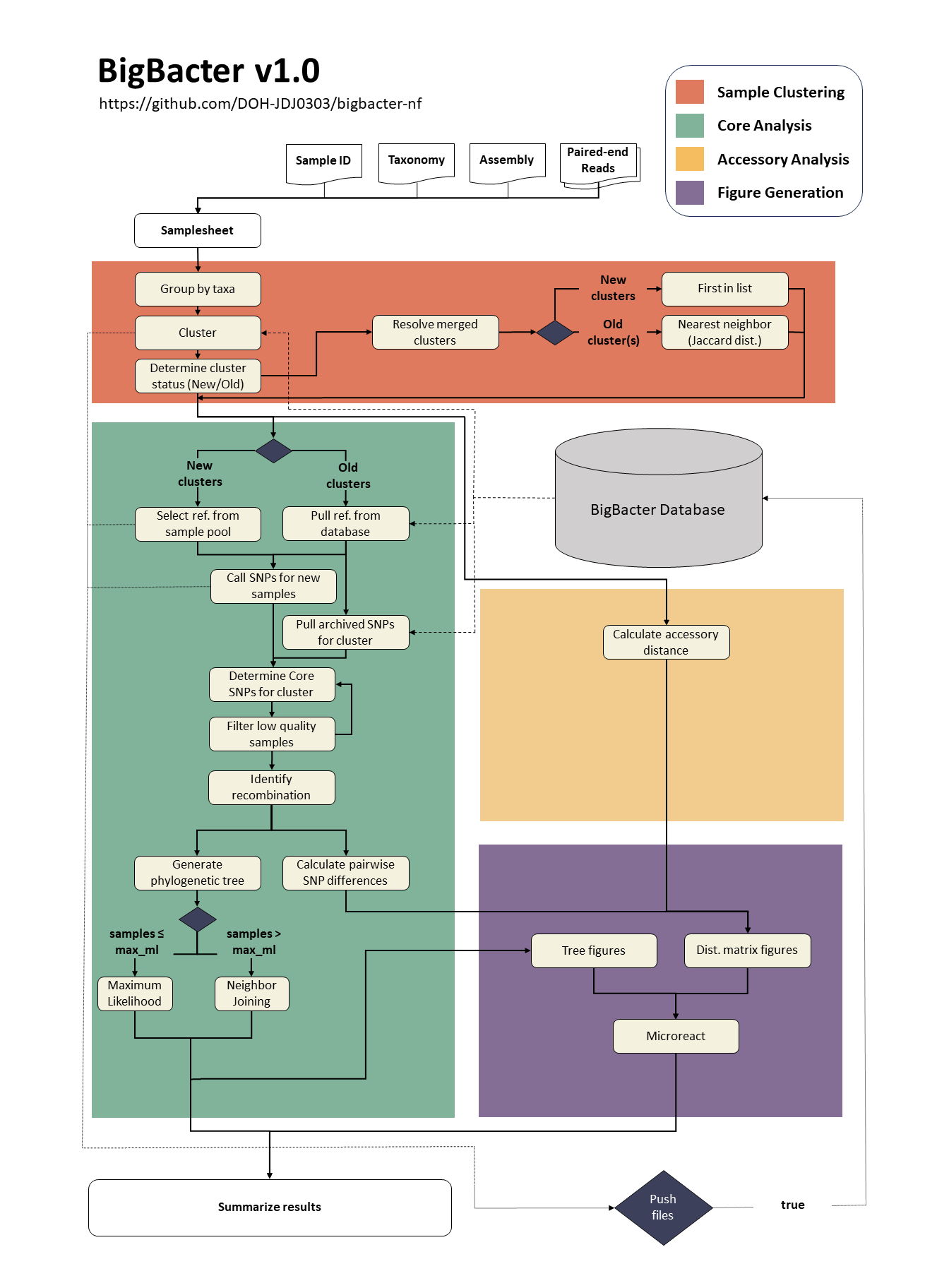
1. BigBacter Database
BigBacter facilitates genomic surveillance by maintaining a database of samples. This database is searched each time you run the pipeline, and samples that closely match current samples are automatically pulled from the database and included in your analysis.
Below is a basic diagram of how the BigBacter database is structured:
${db}
└── ${taxa}
    ├── pp_db
    │   └── ${timestamp}.tar.gz
    └── clusters
        └── ${cluster}
            ├── assembly
            │   └── ${sample}.fa.gz
            ├── ref
            │   └── ref.fa.gz
            └── snippy
                └── ${sample}.tar.gz
Each component is described in greater detail below.
Files are saved to the BigBacter database even if they fail QC.
1.1 PopPUNK Database
db/${taxa}/pp_db/${timestamp}.tar.gz
PopPUNK is used to cluster samples into closely related groups prior to core SNP analysis (learn more here). A PopPUNK database must be configured for each species you plan to analyze (see Full Instructions). Upon configuration, BigBacter will save a tar.gz compressed version of your PopPUNK database to a species-specific directory. This database will be updated each time the species is run through BigBacter and the new version will be named with an epoch timestamp. This timestamp is intended as a failsafe in case you ever want to go back to an earlier version of the PopPUNK database. BigBacter will always select the PopPUNK database with the most recent timestamp (or largest number).
It is recommended that you configure all PopPUNK databases to a common directory (specified with
--db). This will allow you to include multiple species on a single run.
1.2 Reference Genomes
db/${taxa}/clusters/${cluster}/ref/ref.fa.gz
A reference assembly is selected for each PopPUNK cluster from the input assemblies. This reference is saved to the cluster-specific directory within the BigBacter database and used for all future core SNP analyses for that species-cluster.
You can ensure that a specific reference genome is used by supplying it as the only sample for that species-cluster on the BigBacter run. Alternatively, you can add it directly to the BigBacter database, assuming you know the PopPUNK cluster number.
We have observed poor performance when using GenBank assemblies (SKESA) for references, resulting in multiple samples failing QC due to low genome fraction.
1.3 SNP Files
db/${taxa}/clusters/${cluster}/snippy/${sample}.tar.gz
SNP files generated by Snippy are saved as tar.gz compressed directories for each sample in their assigned species-cluster directory. These files are used to build the core genome each time samples belonging to this species-cluster are identified. Storing SNP files in this manner is highly efficient because it:
- avoids having to re-align reads each time the core genome is constructed (which is the most computationally intensive part);
- significantly reduces the size of the files being stored (a VCF file is 1/10th the size of raw read files).
That said, these files are specific to the reference used to create them, which means you have to start from scratch any time you want to switch reference genomes.
1.4 Assembly Files
db/${taxa}/clusters/${cluster}/assembly/${sample}.fa.gz
A copy of each assembly file is saved to the database for future use. These are not currently used by the pipeline but will have function in future versions of BigBacter.
1.5 Pushing Database Files
It is recommended that you check your BigBacter results prior to pushing the results. Once you have confirmed you are satisfied with the results, you can push them using the --push true -resume options.
2. Input Quality Control
BigBacter was originally designed to use trimmed reads generated by bacterial analysis pipelines, like PHoeNIx. However, the option to download reads and assemblies directly from NCBI introduced a need to perform basic input QC. BigBacter uses fastp and seqtk to accomplish this. You can adjust the minimum contig length filtered by seqtk using the --min_contig_len option. You can skip input QC using --assembly_qc false and/or --read_qc false, though this is not recommended.
Future versions of BigBacter will likely include a basic genome assembly option to overcome the issues observed when using NCBI assemblies (SKESA) as references.
3. Sample Clustering
BigBacter clusters samples in two stages:
- By the taxonomy name in the
samplesheet.csv. - By the cluster number determined by PopPUNK.
BigBacter automatically resolves any clusters that are merged by PopPUNK by selecting the individual cluster that contains the closest matching isolate, as determined using the Jaccard distance. You can turn off this feature using
--resolve_merged false, but it is not recommended.
4. Core SNP Analysis
4.1 SNP Calling with Snippy
Core SNP analysis is accomplished using Snippy. While there are many bacterial SNP calling tools available, Snippy remains one of the fastest and most reliable. It is also very convenient because it outputs data in a format that facilitates incremental analyses — which is basically the whole idea behind bacterial genomic surveillance.
Core SNPs are called using a three-stage process:
- Individual SNPs are called for each sample using
snippyand the cluster-specific reference assembly. The results are saved astar.gzcompressed archives and pushed to the BigBacter database for future use. - Core SNPs are called from the individual SNP calls using
snippy-core. - Low quality samples are removed from the analysis and step 2 is performed again.
Samples are considered low quality if they fail one of the following QC thresholds:
| QC Metric | Default Threshold | Parameter |
|---|---|---|
| Minimum Reference Genome Fraction | 85% | --min_genfrac |
| Maximum Heterogeneous Regions | 5% | --max_het |
| Maximum Low Coverage Regions | 1% | --max_lowcov |
These QC metrics are designed to minimize core genome shrinkage. You can learn more about each metric on the Inputs page.
4.2 Recombination Detection with Gubbins
The cleaned full alignment file generated by Snippy is provided to Gubbins and recombination is detected. Gubbins produces a tree during this process; however, this tree is not used in the analysis, as it was found to be inconsistent.
4.3 Pairwise SNP Differences with snp-dists
Pairwise SNP differences are determined using snp-dists. This is performed for all samples using the clean Snippy alignment and any clusters that have at least one SNP and/or more than 2 samples using the Gubbins core alignment.
5. Phylogenetic Trees
A core SNP tree is generated for clusters containing at least 2 samples that pass QC. Trees are built using the maximum likelihood approach by default; however, this can be computationally intensive for large clusters, so BigBacter comes with an option to automatically switch to a much faster (but less reliable) neighbor-joining approach (controlled using --max_ml; default: 500 samples).
Below is more information about each tree building approach.
5.1 Maximum Likelihood Trees using IQTREE2
When below the --max_ml threshold, a maximum likelihood tree will be generated via IQTREE2 using the general time reversible (GTR) model allowing for a proportion of invariable sites (+I) with a discrete Gamma model (+G) and 1000 rounds of rapid bootstrapping. While IQTREE2 has an option for automated model selection, this process is normally very slow. For this reason, a more standardized model was selected based on the recommendations in this paper. Ascertainment bias is corrected via -fconst using constant sites determined via snp-sites, and branch lengths are converted to estimated nucleotide substitutions using the reference genome size. Maximum likelihood trees are split into partitions using the R packages cutree and hclust based on the estimated nucleotide threshold set using --partition_threshold (default 100).
5.2 Neighbor-Joining Trees via RapidNJ
When above the --max_ml threshold, a neighbor-joining tree will be generated via RapidNJ (hey, at least it’s not UPGMA). Branch lengths are not converted to estimated nucleotide substitutions, negative branch lengths are set to zero, and a corrected tree is saved (${timestamp}-${species}-${cluster}-core.corrected.nwk). This approach should only be used if you do not have the computational power to use the maximum likelihood approach.
6. Accessory Genome Analysis
Accessory distances are calculated by PopPUNK during cluster assignment. For more information on how to interpret these distances, read the PopPUNK manuscript. These distances are expected to be the lower floor of true accessory differences. This is because k-mer based approaches do not take into account synteny and struggle with repetitive regions. That said, this provides a rapid approach to go beyond the core genome and can indicate when further analysis using more robust accessory genome analyses may be warranted.
This will likely be replaced by pangenome-based accessory gene analysis in future versions of BigBacter.
7. Figure Generation
BigBacter can create both static images (.jpg) and dynamic images, using Microreact files.
7.1 Microreact Files
BigBacter creates up to two Microreact files (.snippy.microreact and .gubbins.microreact) for each species-cluster containing 2 or more samples using custom R and Bash scripts. These files contain the core SNP tree, core SNP matrix, accessory distance matrix, and the run summary. Microreact files can be viewed at https://microreact.org/upload.
7.2 Static Images
Static images are saved for all species-clusters containing at least 2 samples but fewer than the threshold specified by --max_static (default 100) using custom R scripts.
Increasing
--max_staticmay cause R to fail when attempting to create static images.
Keep your sample names below 20 characters to avoid figure formatting issues.
8. Run Summary
A tabulated summary is generated for each BigBacter run. This contains clustering information, sample quality results, and a simple linkage interpretation guide. This summary is generated using custom R scripts.